Budgeting and forecasting tool comparison: Excel vs. BI Book

Are you considering adopting a new budgeting tool? In this article, we break down the differences between Excel and BI Book Planning as budgeting and forecasting tools.
Excel is still the go-to budgeting tool for many small and medium-sized businesses. However, as a company grows, collaboration increases, and the need for more complex data arises, its limitations often start to show.
Not because Excel isn’t a great tool — but because it wasn’t designed for budgeting.
Now, let’s take a closer look at how Excel and a modern budgeting tool truly compare.
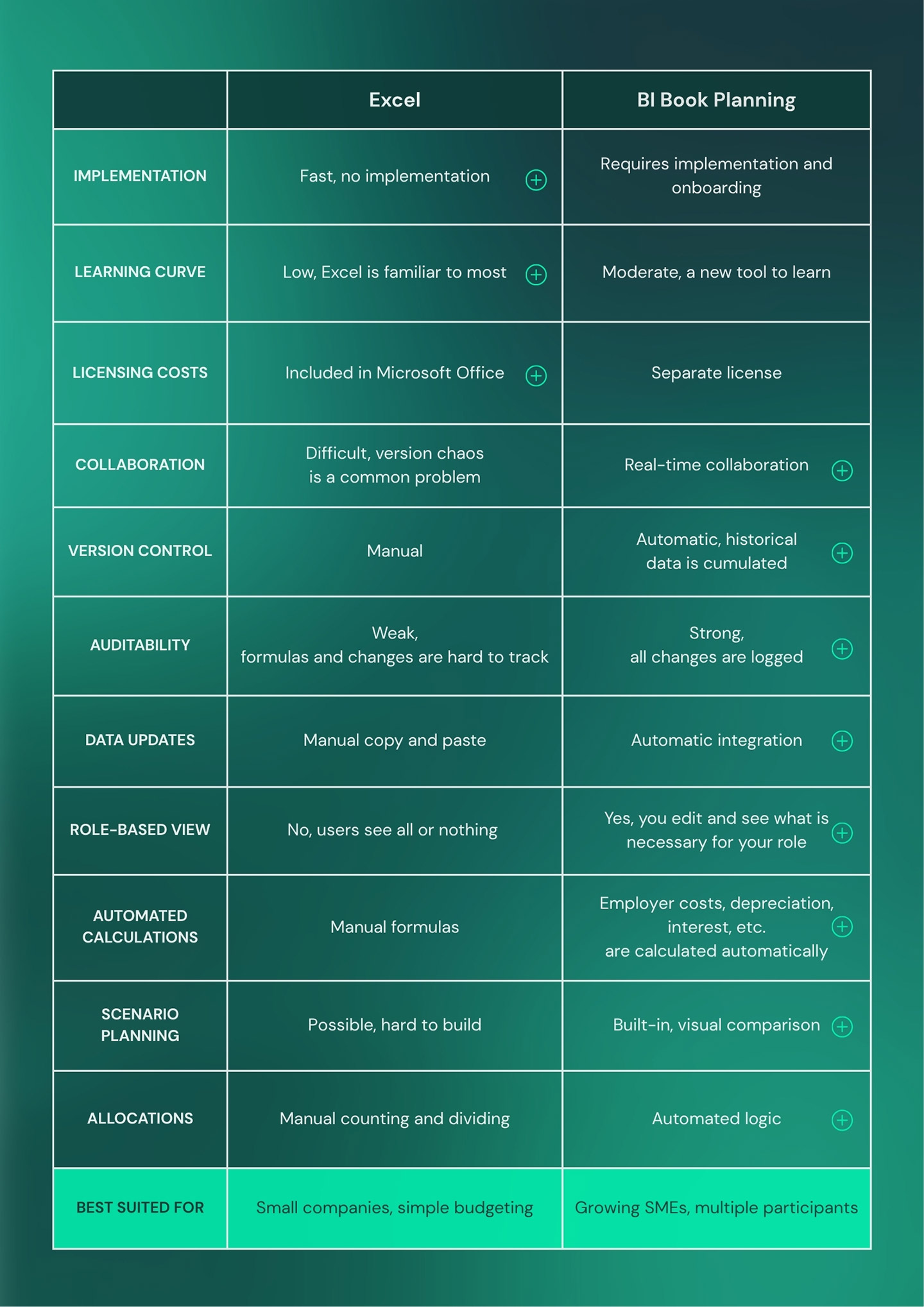
Budgeting and forecasting tools compared – Excel vs. BI Book
BI Book Planning in Budgeting
BI Book Planning brings a modern, collaboration-driven approach to budgeting and forecasting, making financial planning significantly smoother and more transparent. The solution is purpose-built for these needs, which is reflected in its practicality: everyone works within the same real-time view, eliminating the need to manage multiple versions.
Integration with financial management systems such as Netvisor ensures that figures are always based on up-to-date data, while role-based input views make participation clear—each user is responsible only for their own area.
Automated calculations reduce manual effort and minimize the risk of errors: for example, employer on-costs, depreciation, and interest expenses are generated automatically based on predefined logic within the system. In addition, advanced allocations distribute costs automatically, and intelligent suggestions leverage historical data and trends to support planning.
Scenario comparison is a built-in feature, making it quick and easy to analyze different options. To top it all off, change history is fully recorded, making the entire process auditable and reliable.
It’s worth noting that making the most of BI Book Planning requires implementation and onboarding, and its structure cannot be modified as freely on the fly as in Excel. Therefore, the solution works best in organizations where budgeting is a shared, multi-user process—and where the structure it provides is seen as an advantage rather than a limitation.

Excel in Budgeting
Excel is a quick-to-adopt tool that lowers the threshold for starting financial planning. Its greatest strength is flexibility: a budget model can be built entirely to fit specific needs without constraints, and work can begin immediately without separate system integrations or licensing costs. This makes Excel an especially effective solution for small businesses or simple budgeting needs, where a lightweight and fast process is key.
However, as scale increases, Excel’s limitations start to become apparent. Version control quickly becomes a challenge as multiple files are created and identifying the most up-to-date version gets harder. Manually updating data takes time and introduces a risk of errors, which can reduce the reliability of forecasts. Collaboration is not seamless, as multiple users cannot work on the same dataset simultaneously without compromises.
In addition, complex formulas can break unnoticed, historical data may be lost, and the process is not truly auditable. Building scenarios is labor-intensive and often multiplies the workload, as different options need to be created as separate versions.
The lack of role-based views also means that users cannot be clearly restricted to their own areas of responsibility—either everyone sees everything, or visibility is too limited.
Excel is therefore an excellent first step in budgeting. But when scalability, collaboration, and reliable forecasting are required, it may be time to explore other options.
Which budgeting tool should you choose?
Excel is a solid starting point when a company is small, the process is simple, and one person prepares the budget once a year.
BI Book Planning comes into play when budgeting spans multiple departments, forecasts are updated more frequently than once a year, and manual steps—such as calculating employer costs, consolidating versions, and allocating expenses—start consuming time that you don’t have.
A tool doesn’t solve strategy. But the right tool frees up time for what strategy truly depends on: understanding, questioning, and decision-making.
SUMMARY
- Excel is flexible, but quickly reaches its limits when there’s more than one user
- BI Book Planning is built for collaboration, automation, and continuous forecasting
- The best tool is the one that fits your process—not the one you’re used to